> For the complete documentation index, see [llms.txt](https://docs.probly.com/llms.txt). Markdown versions of documentation pages are available by appending `.md` to page URLs; this page is available as [Markdown](https://docs.probly.com/fees-and-settlement/fees.md).
# Fees
How trading fees work on Probly.
Probly charges a small **taker fee** on trades that match immediately against the order book.
* **Always paid in USDC** — never deducted from your shares. The number of shares you enter is exactly what you receive (or deliver)
* **Only takers pay** — limit orders that rest on the book (makers) are never charged. See [How Orders Match](/markets-and-trading/matching-logic.md) for how maker vs taker is decided
* **Shown separately** in the order panel before you confirm, then applied automatically at match time
## Fee Formula
```
takerFee = C × p × takerFeeRate × (p × (1 − p))^exponent
```
| Symbol | Meaning |
| ---------------- | -------------------------------------------- |
| **C** | Number of shares traded |
| **p** | Execution price (between 0.01 and 0.99 USDC) |
| **takerFeeRate** | Per-market fee rate |
| **exponent** | Per-market curve exponent |
{% hint style="info" %}
**takerFeeRate** and **exponent** are set per market and published on the market page before you trade.
{% endhint %}
## **Fee Rates by Market Category**
`TakerFeeRate` is assigned based on the market's category. The Fee Type Code appears in the order breakdown before you confirm a trade. `MakerFeeRate` is currently set to 0.
Category
Fee Type Code
Taker Fee Rate
Maker Fee Rate
Exponent
General
PBLGEN
0.05
0.00
1×
Weather
PBLWTH
0.05
0.00
1×
Culture
PBLCUL
0.05
0.00
1×
Economics
PBLECO
0.05
0.00
1×
Mentions
PBLMEN
0.04
0.00
1×
Tech
PBLTEC
0.04
0.00
1×
Politics
PBLPOL
0.04
0.00
1×
Finance & Prices
PBLFIN
0.04
0.00
1×
Crypto
PBLCRY
0.07
0.00
1×
Sports
PBLSPO
0.05
0.00
1×
Others
PBLOTH
0.04
0.00
1×
The exponent scales the fee curve: at 1, the curve applies linearly with no additional adjustment. Future categories or promotional periods may use a different exponent.
## The Fee Curve
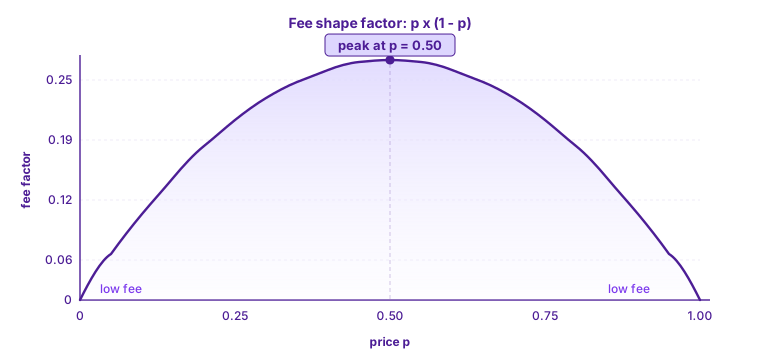
The factor *p × (1 − p)* shapes the curve — it peaks at *p = 0.50* and tapers toward both extremes:
In practice:
* **Fees peak at 50% probability** — where uncertainty is highest
* **Fees shrink toward both ends** — a heavy favorite at 95¢ costs much less to trade than a coin-flip at 50¢
* **Symmetric around 50¢** — a trade at 30¢ costs the same dollar fee as the same-size trade at 70¢
* **Very small trades near the extremes may incur no fee at all** (see [Fee Precision](#fee-precision))
## How You're Charged
Every order panel breaks the trade into the same fields:
| Field | What it means |
| ---------------------- | ----------------------------------------------------------------- |
| **Shares** | Exactly what you'll receive (buy) or deliver (sell) |
| **Order Value** | Shares × Price |
| **Est. Fee** | The taker fee estimate in USDC |
| **Total** (buy) | Order Value + Est. Fee — the exact amount that leaves your wallet |
| **Net Receive** (sell) | Order Value − Est. Fee — the USDC credited to your account |
For the same size and price, the USDC fee is identical in either direction.
## Estimate vs Actual
The **Est. Fee** is calculated at the **highest possible rate** (fully taker at *p = 0.50*). The **actual fee** is set at match time from the fill price — so the final amount is **at most** the estimate, usually less.
> Hover the **ⓘ** icon next to **Total** (buy) or **Net Receive** (sell) to see the breakdown.
## Worked Example
Buying **5 shares** at a limit price of 80¢:
| Field | Value |
| ----------- | ------------------------------------------------------------------------ |
| Shares | 5 |
| Order Value | 5 × $0.80 = $4.00 |
| Est. Fee | ≈ $0.03 |
| **Total** | **$4.03** |
| To Win | $5.00 if YES wins, $0 if it loses *(total payout — includes your stake)* |
You pay **$4.03** and receive exactly **5 shares**.
### Curve Factor at Key Prices
| Price (p) | Curve factor (p × (1 − p)) | Relative fee |
| --------- | -------------------------- | -------------- |
| 50¢ | 0.2500 | Highest |
| 40¢ / 60¢ | 0.2400 | Slightly lower |
| 30¢ / 70¢ | 0.2100 | Moderate |
| 10¢ / 90¢ | 0.0900 | Low |
| 5¢ / 95¢ | 0.0475 | Very low |
## Fee Precision
* Fees are rounded to 4 decimal places in USDC
* Smallest charged: **0.0001 USDC**
* Anything below that rounds to zero — very small trades near the price extremes may incur no fee at all
## Where to Find Your Fee
* **Before** a trade — estimated fee and final total appear in the order panel
## Related
* [How Orders Match](/markets-and-trading/matching-logic.md) — how maker / taker is determined
* [Market Orders](/markets-and-trading/market-orders.md) — execute immediately at the best price
* [Limit Orders](/markets-and-trading/limit-orders.md) — rest on the book at your chosen price
* [Deposits & Withdrawals](/get-started/deposits-and-withdrawals.md) — free deposits, 1 - 2 USDC withdrawal fee
* [Referrals](/fees-and-settlement/referrals.md) — earn a share of fees from users you invite
---
# Agent Instructions
This documentation is published with GitBook. GitBook is the documentation platform designed so that both humans and AI agents can read, navigate, and reason over technical content effectively. Learn more at gitbook.com.
## Querying This Documentation
If you need additional information that is not directly available in this page, you can query the documentation by asking a question.
Perform an HTTP GET request on the following URL with the `ask` and `goal` query parameters:
```
GET https://docs.probly.com/fees-and-settlement/fees.md?ask=&goal=
```
`ask` is the immediate question: it should be specific, self-contained, and written in natural language.
`goal` is what the user is ultimately trying to achieve, the reason they need the answer. Sharing it helps GitBook give you a better, more relevant answer. A goal is most helpful when it describes the outcome the user wants rather than restating the question. For example, with `ask=how do I create an API token`, a goal like `automate deployments from our CI pipeline` lets GitBook tailor the answer to that use case.
The response will contain a direct answer to the question and relevant excerpts and sources from the documentation.
Use this mechanism when the answer is not explicitly present in the current page, you need clarification or additional context, or you want to retrieve related documentation sections.